Tailor your CV to the job description
Use the employer's words for the work you have already done, and keep your own CV untouched. Tailoring changes the wording, not the facts.
 The cvscored team
Check your CV against a job. Free, no account.
Add your CV and the job. You see your match score and how far it can rise.
We never train AI on your CV. Hosted in Germany under GDPR.
Contents
- Step by step
- The wording changes, not the facts
- Tailoring by hand, without an app
- One CV per field, not per advert
- Start from the match
- Add only what is true
- Which line goes where
- Build the PDF
- After you send
- Lena Hoffmann's same work, in the employer's words
- Checklist
- One honest limit
- Key takeaways
- Frequently asked questions
- Related guides
Step by step
Check the match first
Run the match before any tailoring. The list of requirements is the map. Without it you are guessing which words matter.
Change the words, not the facts
Your dates, titles, employers and numbers stay exactly as they are. Only the wording changes, and only where the meaning is the same.
Put the strongest work first
Move the lines that answer the top requirement near the top. Order is the easiest honest change you can make.
Add what is missing and true
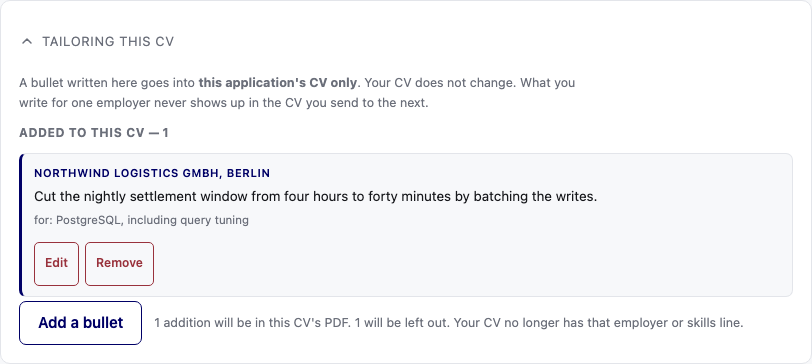
A gap gets a card where you write what you actually did. The app turns your words into a CV line and shows what it drew on.
Keep the added lines in this application
Added lines go into this application's CV only. Your own CV does not change.
Build the PDF and check it
Pick one of five layouts. The app builds a real PDF with the tailoring already in it. A page that overflows is reported, not cut.
Save the version you sent
Keep the tailored CV with the application. If the employer calls, you want to read the exact CV they read, not the one you meant to send.
The wording changes, not the facts
Tailoring is choosing which of your real experience to put first.
Your dates, titles and numbers stay exactly as they are.
A tailored CV is still your CV. It is the same person, written for one reader.
If a change would not survive a question in the interview, do not make it.
Tailoring by hand, without an app
Print the advert and mark every requirement.
Print your CV and write the matching line beside each mark.
Rewrite three lines in the employer's words where the meaning is the same.
Move the strongest line to the top and cut one weak line.
That is most of the work a tailoring tool does, and it takes an hour.
One CV per field, not per advert
You do not need a new CV for every job.
Keep one master CV and one version per field you apply in.
The master holds everything. The versions hold the useful parts.
Tailor the version, send it, and keep it with the advert.
After a month you will have a library that fits most jobs in your field.
Start from the match
The check shows each requirement and the line that answers it.
Requirements you cover in other words are shown with both phrases.
One click adopts the employer's word where the meaning is the same.
Work through the list from the top. The top requirement is why they are hiring.
Add only what is true
A gap gets a card where you write what you actually did.
The app turns it into a CV line and shows the lines it drew on.
Added lines go into this application's CV only. Your own CV does not change.
If you cannot write the line yourself, the gap is real and the interview will find it.
Which line goes where
Put the line that answers the top requirement in the top third of the page.
Keep the most recent job first, and keep its dates clear.
Move the tools and skills next to the work that uses them.
Take out the interests section if it takes space from the work.
A reader skims for ten seconds. Make those ten seconds count.
Build the PDF
Pick one of five CV layouts.
The app builds a real typeset PDF with the tailoring already in it.
A page that overflows is reported rather than silently cut.
Check the PDF on a phone as well as a laptop, because many readers use a phone.
After you send
Save the tailored CV and the advert together.
Note which words you adopted. They are useful in the interview.
If you get no reply, the tailored version is not the reason. It is usually the timing.
Reuse the wording that worked for the next advert in the same field.
Lena Hoffmann's same work, in the employer's words
The facts do not move. The wording meets the advert where it already means the same thing.
| Her CV says | The posting says |
|---|---|
| Led a team of eleven engineers | Leading a small team of engineers |
| Moved forty services off a shared PostgreSQL database | PostgreSQL, including query tuning |
| Automated the release day with Jenkins and Terraform | Infrastructure as code with Terraform |
| Rebuilt the dispatch platform on Kafka | Kafka or a comparable event-streaming platform |
An invented example.
Good points
- Keeps the facts and changes the wording.
- Leaves your main CV as it was.
Not so good
- Only what is already true can be tailored.
- A tailored CV is for that one application.
Checklist
- The facts are unchanged: dates, titles, employers, numbers.
- The top requirement is answered near the top.
- Every added line is work you really did.
- The master CV is untouched.
- The layout is one of the five.
- The PDF is checked on a phone.
- The tailored CV is saved with the advert.
- You know which words you adopted.
One honest limit
Added lines stay in this application's CV. If the work is not true, do not add it, because a wrong line costs you the job later.
Key takeaways
- Tailor from the match, not from memory.
- Change the wording, not the facts.
- Add only work you have really done.
- Keep your main CV untouched.
Frequently asked questions
- Does the app invent experience?
- You write what you did. The app turns your own words into a CV line and shows what it drew on.
- Does it change my main CV?
- No. Tailored bullets go into that application's CV only.
- Which layouts can I use?
- Five layouts, each built as a real PDF. You see them all in the app.
- What if a page overflows?
- The build reports it. Nothing is cut without telling you.
- Is tailoring free?
- Your first 3 applications are free, with every feature. Create an account to build and keep the PDFs.
- Should I send the tailored CV or my own?
- Send the tailored one for that job. Keep your own CV as the master for the next application.