Add a job by link or by text
cvscored compares your CV with one job at a time. You add the job by its link or by pasting its text. Here is when to use which, and what happens next.
 The cvscored team
Check your CV against a job. Free, no account.
Add your CV and the job. You see your match score and how far it can rise.
We never train AI on your CV. Hosted in Germany under GDPR.
Contents
Step by step
Open the job advert
Open the advert on the employer's site or the job board. Check that it is the full advert, not a short preview.
Try the link first
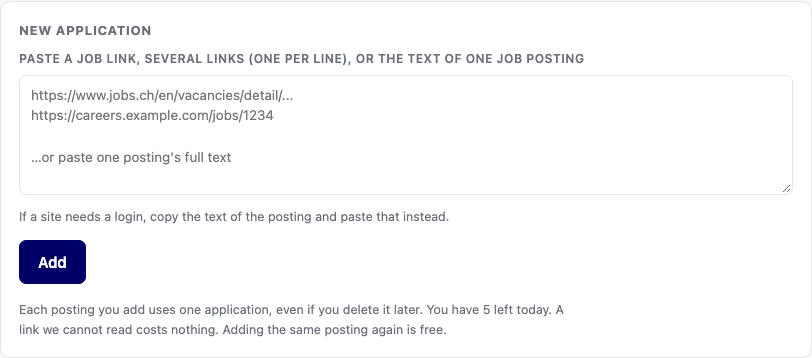
Copy the address from the browser bar and paste it into the box under New application. Use the address of the advert itself.
Paste the text when the link does not work
If we cannot read the page, you see why and a box for the text. Select the whole advert, copy it and paste it there.
Check what we read
The application shows the company, the job title and the language we found. If the company or the title is wrong, change it.
Let the score run
A job added here is scored at once: each requirement is checked against your CV. Each posting you add uses one application.
Keep the advert for later
We keep the text of the advert with the application. Open Saved job ad to read it again, even after the advert is taken down.
When to use the link
Use the link when the advert is on an open web page: the employer's own careers page or a public job board.
The link keeps the source. You can open the advert again from the application, and apply from there.
You can paste several links at once, one per line. Each one becomes its own posting and uses one application.
With the browser extension, you press Save on the job page instead. The job waits in Postings you added, at no cost, until you score it.
When to paste the text
Paste the text when the site only shows the job after you sign in. We cannot sign in for you.
Paste it when the site does not let us read its pages. Indeed is one of them; the extension or the text works there.
Paste it when the advert came by email, as a PDF, or from a recruiter, and has no web page.
Paste it when the page holds more than one job, or a lot of other text around the advert.
Paste the whole advert, with the company name and the job title. A few lines are not enough to find the requirements.
What happens to the posting
We read the advert and pull out each requirement. We note which ones it calls essential.
We find the company, the job title and the language of the advert, and show them on the application.
The advert's text is saved with the application in your account. It is not shared with employers.
If you delete your account, the posting goes with everything else.
If we cannot read a link
You see a calm note that says why: the site needs a sign-in, blocks reading, took too long, or showed no job.
A link we cannot read costs nothing. Paste the text, and the link stays as the source.
If a page took too long, try again in a moment. Busy sites are sometimes slow.
If the advert has gone, the link cannot help. Ask the employer for the text, or look for the same job on their own site.
Link or text: what changes in the result
The score is worked out the same way for both: from the requirements in the advert.
A link adds the source address, so you can open the advert again from the application.
Pasted text is exactly what you chose. Cut a long company story if you like, but keep every requirement.
Lena Hoffmann adds three jobs
Lena Hoffmann is the made-up person in our examples. She adds three made-up jobs in three ways.
| Where the job is | What she adds | What happens |
|---|---|---|
| Northwind Logistics' own careers page | The link | The advert is read and kept, with its source. |
| A job board that needs a sign-in | The pasted text | The text is read; the link stays as the source. |
| An email from a recruiter | The pasted text | The text is read and kept with the application. |
An invented example.
Good points
- Two ways in, and the extension as a third.
- The advert stays readable after it is taken down.
Not so good
- Some sites cannot be read without a sign-in.
- Pasted text has no source unless you paste the link with it.
Checklist
- The link is the advert's own address.
- The pasted text is the whole advert.
- The company name and job title are in it.
- The company, title and language look right.
- The job is one you would really take.
- You add it when you want the score.
One honest limit
We can only read what a page shows without a sign-in. Some sites block reading, and then pasting the text is the only way.
Key takeaways
- Link first, text when the link fails.
- Paste the whole advert.
- Check the company, title and language.
- A job added here uses one application; a link we cannot read costs nothing.
Frequently asked questions
- Which is better, the link or the text?
- Try the link first. It keeps the source. Paste the text when the link does not work.
- Does adding a job cost an application?
- Yes, a job added in the New application box is scored and uses one application. A link we cannot read costs nothing. Saving with the extension is free until you score.
- Why can you not read some sites?
- Some sites show the job only after a sign-in. Others do not let tools read their pages. Paste the text there.
- Can I add several jobs at once?
- Yes. Paste several links, one per line. Pasted text is one posting at a time.
- What if the advert is taken down later?
- We keep its text with the application. Open Saved job ad to read it again.
- Do you share the posting or my CV with the employer?
- No. Both stay in your account. You send your application yourself.